


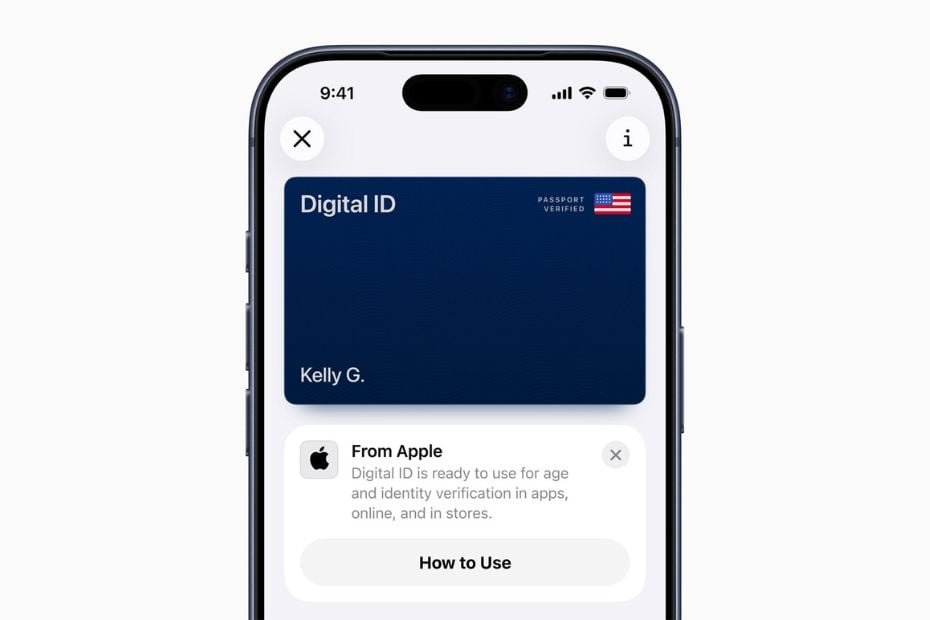

Image credit: Apple/Website
Apple announced the launch of Digital ID, a new feature allowing users to create a secure digital identification in Apple Wallet using information from their US passport. The rollout marks a major expansion of Apple’s efforts to replace physical credentials with digital, privacy-focused alternatives integrated directly into the iPhone and Apple Watch ecosystem.
At launch, Digital ID will be available in beta for identity verification at Transportation Security Administration (TSA) checkpoints across more than 250 US airports, enabling travellers to verify their identity during domestic flights without showing a physical ID. Apple said that additional acceptance points and use cases will follow in the coming months, an Apple newsroom report said.
Read more-Apple drops next-generation tech: New devices powered by M5 chip
Apple’s Digital ID initiative aims to bring digital identity access to a broader range of users, including those who do not yet have a REAL ID-compliant driver’s license or state ID. However, Apple clarified that the new feature is not a replacement for a physical passport and cannot be used for international travel or border crossings.
“With the launch of Digital ID, we’re excited to expand the ways users can store and present their identity, all with the security and privacy built into iPhone and Apple Watch,” said Jennifer Bailey, Apple’s vice president of Apple Pay and Apple Wallet. “Since introducing the ability to add a driver’s license or state ID to Apple Wallet in 2022, we’ve seen how much users love having their ID right on their devices. Digital IDs bring this secure and convenient option to even more users across the country, as they can now add an ID to Wallet using information from their US passport.”
This announcement builds on Apple’s growing suite of identity and payment tools, reinforcing the company’s strategy to make the iPhone a central hub for daily authentication and verification needs.
How to add a Digital ID to Apple Wallet
Setting up a Digital ID is designed to be simple and secure. Users begin by tapping the Add (+) button at the top of the Wallet app and selecting driver’s license or ID Cards. They then choose Digital ID and follow the on-screen prompts to start verification.
The setup process requires scanning the photo page of a physical US passport and reading the embedded chip on the passport using the iPhone’s NFC capability. This ensures data authenticity. Users are then prompted to take a selfie and complete facial and head movements for biometric verification.
Once verified, the Digital ID is automatically added to Apple Wallet and ready for use.
To present a Digital ID in person, users can double-click the side or Home button to access Apple Wallet, select Digital ID, and hold their iPhone or Apple Watch near an identity reader. They can then review the information being requested and use Face ID or Touch ID to confirm authentication.
Apple said that this same technology will eventually extend beyond airport checkpoints. In the future, users will be able to present their Digital ID at select businesses, organisations, and online services for identity and age verification, broadening the scope of digital identity adoption.
Privacy and security at the core
True to Apple’s long-standing emphasis on user privacy, the Digital ID system leverages the security architecture already built into iPhone and Apple Watch. All Digital ID data is encrypted and stored locally on the device.
Apple underscored that it cannot see when, where, or how users present their Digital ID, nor what information is shared. Only the necessary details for a transaction are transmitted, and users must approve each data request with Face ID or Touch ID before information is shared.
The feature also ensures that users do not have to unlock or hand over their devices to verify their identity, an added layer of protection against misuse or theft.
Building on state ID and driver’s license integrations
The introduction of Digital ID represents the next step in Apple’s digital identity roadmap. The company first allowed users to add state IDs and driver’s licenses to Apple Wallet in 2022, partnering with state governments and the TSA to pilot the program.
Currently, driver’s license and state ID support is live in 12 US states and Puerto Rico, with recent expansions to Montana, North Dakota, and West Virginia over the past six months. Internationally, Apple has introduced the capability in Japan, where users can now store their My Number Card on iPhone, marking the feature’s first rollout outside the United States.
With Digital ID, Apple continues to position itself at the forefront of the digital identity revolution, blending government-grade authentication with the seamless convenience of its ecosystem.
